(629) 268-3500
  Written requests preferred

IT Support Tools
Access our remote support tools and utilities to get quick assistance with your IT issues.
Need Help Right Now?
If you're running into an issue, I can securely connect to your computer and take care of it for you.
GET REMOTE HELPWhat to expect
- Click the button above
- Download the support tool for your device
- Open it and click Install
You don't need to install anything permanently for most sessions. Depending on your browser and Windows, you may need to approve the download or installer. Follow the steps that match what you see on your PC.
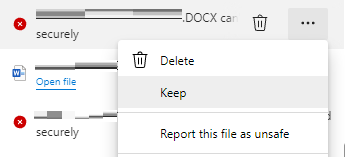
Microsoft Edge: if the download is blocked
In Edge, open the downloads list (… or Ctrl + J), then use the menu on the file and choose Keep.
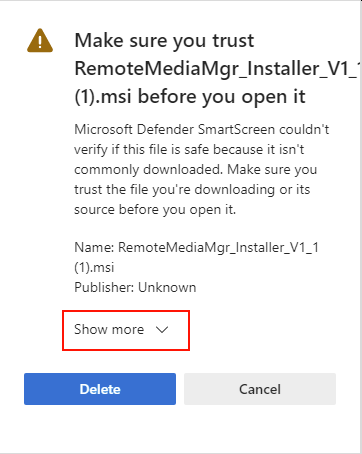
Installer warning (MSI or similar)
Windows may show a SmartScreen window for the installer file. Click Show more, then choose to run or keep the file anyway when that option appears.
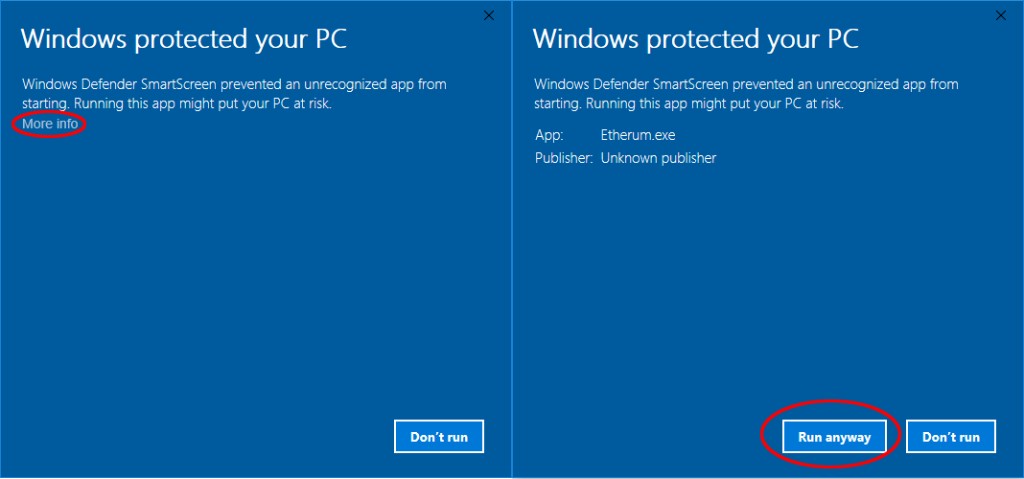
Full-screen SmartScreen (blue prompt)
The first screen may show Don't run. That's expected. Click More info, then on the next screen choose Run anyway.